

Your preferred name is unavailable under .co.za, but a search suggests it may be available under .com. Before switching, remember that an availability result is a snapshot, not a reservation. A domain name availability checker is a practical starting point, but you need to read the result carefully before deciding what to do next.
Search results can differ between checks, and one extension may be taken while another remains available. That does not mean every alternative will suit your website or that a search has secured the name. Compare the exact spelling, how easy it is to say and remember, and whether the extension suits your audience.
This guide explains how to use a domain name availability checker, interpret available, unavailable and unclear results, and assess alternatives without rushing into a poor choice. You will also learn how to record and verify results, and why checking availability and completing registration are separate steps.
Key Takeaways
- A domain name availability checker gives you an initial result, not a guarantee that the name is secured.
- Compare tools by how clearly they show results, which extensions they cover and how easily you can repeat a search.
- Build a shortlist of names and extensions, then record the results so you can compare options calmly.
- Check each candidate for clear spelling, easy pronunciation and memorability, as well as availability.
- Before building your website around a name, consider whether it suits your purpose and is consistent across your online presence.
What a domain name availability checker tells you before you choose
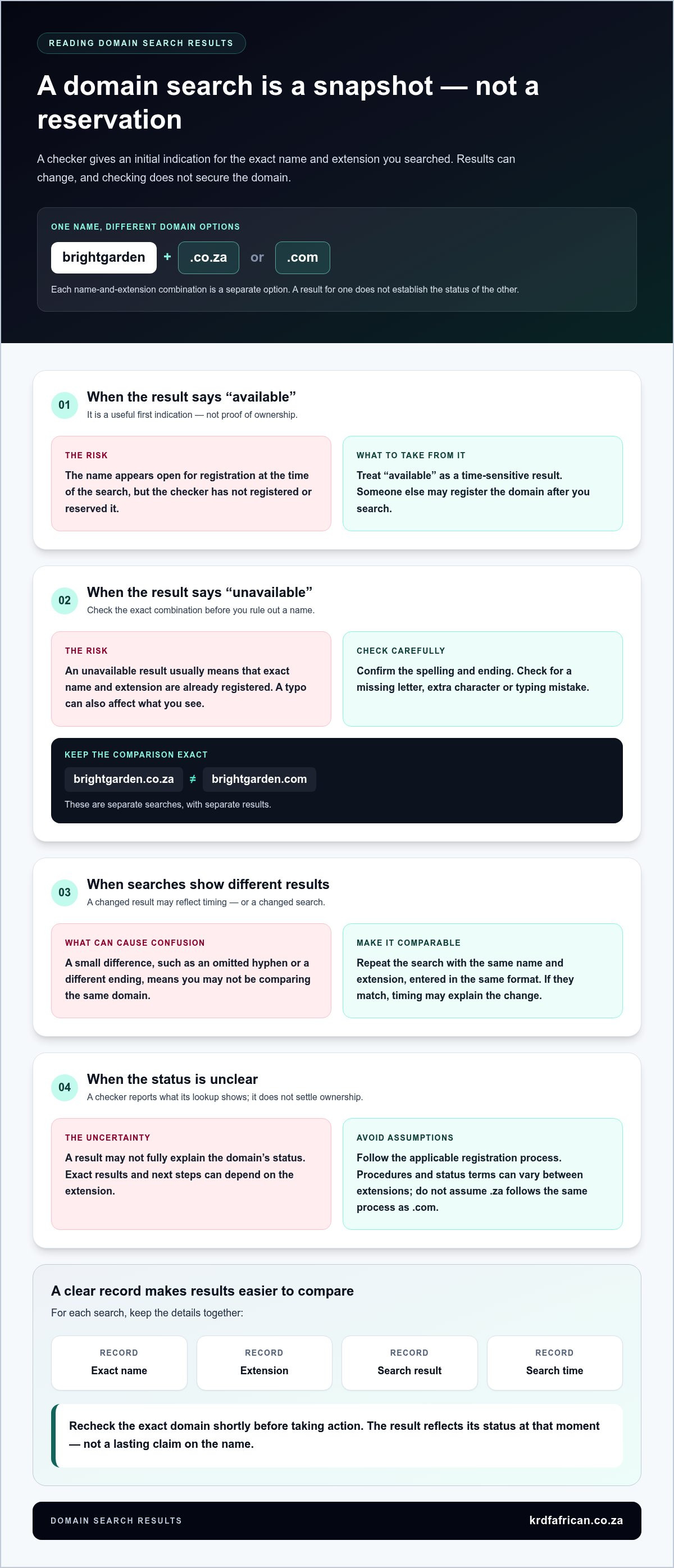
A domain name availability checker searches whether a domain appears available to register. It gives you an initial result for the name and extension you enter. The result is time-sensitive: someone else may register the domain after you search, and the check itself does not reserve or secure it.
A domain has two main parts: the name you choose and the extension at the end. For example, in brightgarden.co.za, “brightgarden” is the chosen name and “.co.za” is the extension. In brightgarden.com, the name is the same but the extension differs. These are separate domain options, so check each name and extension combination individually.
Together, the name and extension form an address people use to find your website. The Domain Name System (DNS) helps direct domain names to the internet services associated with them. Choosing a clear, suitable address early gives you a consistent name to use as you plan your site and other communications.
What does “available” mean in a domain search?
“Available” is a search result, not proof that you own the domain or have completed its registration. It means the name appears open for registration under the extension searched at the time of the check. A name already registered will generally appear unavailable for that extension, although exact results and next steps depend on the extension’s registration process.
Results can change between searches. A domain that appears available may be registered by someone else before you act. A result can also be unclear or may not fully explain the domain’s status. Treat the checker as a useful first step, then follow the applicable registration process if you decide to proceed. Procedures and status terms can vary between extensions, so check current .za information rather than assuming that .co.za follows the same process as .com.
A domain checker shows whether a name appears available at the time of a search. It does not register the name or guarantee that it remains available.
Why check the domain before building your website?
Your domain becomes the web address people need to recognise, remember and type correctly. A short, straightforward name is easier to share aloud or include on printed material. Difficult spelling, confusing wording or an unsuitable extension can make an address harder to use, even if it is technically available.
Check your preferred names before settling on a business identity, designing a website or preparing marketing materials. If your first choice is already registered, you have time to consider a suitable alternative, such as a different name or extension. Checking early can help you avoid changing the address after people have started seeing it on your site, emails or promotional material.
Use the result to guide your decision, not to rush it. Check that the name fits the purpose of your website, is easy to spell and say, and still makes sense with the extension you want. A suitable domain needs to be both available and practical to use.
How domain availability results work, and why they can change
A checker searches the domain name and extension you enter against relevant registration data. The result is a snapshot of the domain’s status at that point in time. It does not complete registration or hold the name for you. If the status changes after the search, a later result may be different.
This distinction matters when you are ready to act. An “available” result is useful evidence to guide your next step, but it is not a promise that the domain will still be available later. An “unavailable” result usually means that the exact name and extension are already registered. A checker reports what its lookup shows; it does not settle ownership or guarantee what can be registered.
What if a domain appears unavailable?
First, check the spelling and extension. brightgarden.co.za and brightgarden.com are separate searches, so a result for one does not establish the status of the other. Check for a missing letter, extra character or typing mistake before ruling out your preferred name.
If the exact combination is still unavailable, consider a clear variation or another extension that suits your audience. Keep the name easy to spell and say. A change that makes the address confusing may not be a practical improvement, even if it produces a different search result.
What if different searches show different results?
Repeat the search using the same name and extension, entered in the same format. Check for small differences, such as an omitted hyphen or a different ending. If the details match, timing may explain the change: domain status can change between checks as registration activity takes place.
Do not assume that one result is an error just because it differs from an earlier search. Treat the latest result as a current indication, then follow the relevant registration process if you decide to proceed. Procedures and status terminology can vary by extension, including .za domains, so avoid applying assumptions from one extension to another.
Recheck the exact domain shortly before taking action. A search result reflects its status at that moment, not a lasting claim on the name.
To keep comparisons clear, record the exact name, extension, result and time of each search. This makes it easier to spot whether you changed the spelling or the result itself changed. If you are still weighing up an option, use the domain name availability checker to search the same combination again.
Compare domain name availability checkers without focusing only on extensions
Compare checkers by how clearly they show what you searched and what the result means. A long list of extensions can help when you are exploring options, but it does not make a name more suitable for your website. Judge a tool by whether it helps you make a clear, consistent comparison, not by the number of endings it displays.
Use the same candidate name and extension when comparing results. That way, you can focus on what each checker communicates rather than mistaking a change in the search details for a difference in availability.
| What to compare | What to look for |
|---|---|
| Result clarity | Does it show the exact name and extension searched, with status wording you can understand? |
| Extension coverage | Does it include the endings relevant to your audience and location? |
| Repeat searches | Can you easily enter the same name and extension again to compare a later result? |
Which domain extension fits your intended audience?
Let your audience, location and brand clarity guide your choice. A .co.za address is a South African domain option and may make local relevance clear to visitors. For an organisation serving Johannesburg, it can be a relevant option to compare with other extensions. A .com address is widely recognised, but that does not mean it suits every organisation or audience. Choose an extension that feels natural beside your name and is easy to remember. Do not assume that a particular extension will improve search rankings.
Registration details and procedures can differ between extensions. If you are considering a .za domain, check current South African registry information for the applicable details rather than relying on assumptions drawn from another ending. Availability alone does not tell you whether an extension is the right fit for your plans.
Which checker details are useful when comparing results?
Check that the result identifies the complete domain you entered, including its extension. Status wording should make the outcome understandable without implying that a search has secured the name. An easy way to repeat a search also helps you compare the same combination over time. If you are checking several candidates, keep your own notes so you can review like-for-like results.
Extra functions are not automatically useful. Focus on the information you need to decide, and do not assume that every checker includes bulk searches, ownership lookups or other tools. A domain name availability checker is most practical when its result is clear and relevant to the name you are assessing.
Once you have chosen an extension that suits your audience, use the domain name availability checker to compare your preferred name and extension. Treat the result as one part of your decision, alongside whether the address is clear, memorable and appropriate for your website.
Use a domain name availability checker to assess a shortlist
A shortlist makes it easier to compare names using more than a single search result. Apply the same checks to each candidate, then record what you find. This keeps the decision organised and helps you avoid choosing a name only because one extension happened to appear available.
Prepare domain name options before searching
Start with names that reflect the organisation or purpose of your website. Say each option aloud and consider whether someone could spell it after hearing it once. Remove confusing spellings, unnecessary punctuation and wording that is difficult to pronounce. A name that looks neat on screen may be less practical if people regularly mistype it or ask how to spell it.
Choose a small set of relevant extensions based on your audience and plans. For a South African audience, you might include .co.za alongside another suitable option, such as .com. You do not need to search every extension. Focus on endings you would genuinely consider using.
Then assess each candidate in a consistent order:
- Write down the exact name, including its spelling and any punctuation.
- Select the extensions that make sense for your intended audience.
- Search each name and extension combination using a domain name availability checker.
- Record the result and the date you checked it.
- Compare availability with clarity, pronunciation and ease of remembering.
Review and record each availability result
Keep a simple comparison record so similar searches do not blur together. Include the exact candidate, the full extension, the result shown and the search date. For example, record greenpath.co.za separately from greenpath.com. The name is similar, but each extension is a distinct option and needs its own result.
Use your notes to compare the practical strengths of each candidate. Consider whether the address is easy to read, say and recall, and whether it fits the website’s purpose. Availability is one part of the decision, not a substitute for checking that the name works for your intended use.
- Exact name: Preserve the spelling and punctuation you searched.
- Extension: Record the complete ending, such as .co.za or .com.
- Result: Note the status wording as displayed.
- Date checked: Add the day of the search to give the result context.
A shortlist with dates makes domain results easier to compare and shows when a preferred option needs a fresh check. Recheck your leading candidate before taking action, as its status may have changed since you made your notes.
Prepare your candidates and check your shortlisted domain names to compare their current results. Use the findings to narrow your options, then review the name itself before building your website around it.
What to do after checking domain name availability
An available result gives you a reason to consider the name, not proof that it is yours. Before building your website around it, make a deliberate choice. Check that the spelling and extension match your intended address, then decide whether the name is clear, appropriate and easy for your audience to use.
If your preferred domain appears available
Review the complete domain shown in the result. A small spelling difference or a different extension can lead to a different address, so compare it with the version you intend to use. Consider how it will look on a website, sound when spoken and appear in your organisation’s communications. Make sure the wording fits the purpose of the site and will not confuse visitors.
If the name still feels right, the next step is to follow the applicable registration process for that extension. Checking and registering are separate actions. The search result does not reserve the domain, complete registration or guarantee that it remains available while you decide. Recheck the exact name and extension before proceeding, then use the relevant process to establish whether registration is completed.
If your first-choice domain is unavailable
Return to your shortlist rather than choosing a quick variation without considering its effect. Try a clear, relevant wording change, or assess another extension if it fits your audience and the website’s purpose. For example, a local South African organisation may weigh a .co.za option against a .com option. The choice should reflect how it wants to present itself, not just which result looks available.
A variation is a different domain choice. Adding a word, changing the spelling or selecting another extension does not make it the same address, and it does not automatically carry the same brand or legal status as your first choice. Review each alternative on its own merits. If it is awkward to say, easy to mistype or unclear beside your organisation’s name, keep looking.
Before settling on an option, check that it is consistent with the name you plan to use across your website and other public communications. A practical domain should be recognisable, straightforward to share and suitable for the people you want to reach. Do not let a single available result outweigh those everyday considerations.
Checking the exact spelling again is a sensible final step, but only the applicable registration process can establish whether the domain has been registered. Once you have a suitable candidate, act on the current result rather than relying on an old search. If it no longer appears available, return to your shortlist and assess the next option.
Ready to review your preferred name again? Run a domain name search for the exact spelling and extension you are considering.
Make your next website decision with confidence
Your domain is one of the first details people will use to find and recognise your website. Give yourself room to choose a name that remains clear and suitable as your plans develop, rather than settling on the first option that produces a promising result.
Use the domain name availability checker as a practical starting point for your South African domain search. Review the name you want, including whether a .co.za extension fits your audience in Johannesburg or elsewhere, then decide on the next step based on the current result. A considered choice now can make it easier to keep your website address consistent as you build your online presence.
Check your domain name availability and take the next step towards choosing an address that works for your website. Start with the exact spelling and extension you have in mind.
Frequently Asked Questions
Can a domain name availability checker guarantee that a domain will still be available?
No. A domain name availability checker reports what its search shows at that moment; it does not hold the name while you decide. A result for a .co.za address could change before you return to it. Search the full spelling and extension again just before following the registration process. Treat the result as a point-in-time guide, not evidence of future availability or ownership.
Why does a domain checker say a name is unavailable?
The name may already be registered under the extension you searched. Check for a typing mistake, then make sure you selected the intended ending, such as .co.za rather than .com. An unavailable result applies to that exact combination. For example, example.co.za and example.com are separate domains, so one result does not establish the status of the other or of every possible variation.
Can I use a domain name if its website is not active?
Not necessarily. A domain can be registered without displaying a public website, so a blank page or inactive site does not mean the address is free to register. The search checks the domain’s status, not whether its owner has published content. If a Johannesburg organisation finds that its preferred address leads nowhere, it should still check the domain result rather than assume it can claim the name.
Is a .co.za domain only suitable for businesses in South Africa?
No. A .co.za address is associated with South Africa and can help make local relevance clear, including for an organisation serving customers in Johannesburg. It is not automatically the right fit for every organisation or audience. Consider where visitors are based and whether the ending makes the website’s identity clear. Before relying on particular eligibility or registration rules, consult current information for .za domains.
What should I do if my preferred domain name is taken?
Confirm the spelling and extension first. Then review your shortlist for alternatives that remain clear and relevant, such as a concise name variation or another extension that suits your audience. Do not choose a confusing substitute just because it appears available. Compare how each option reads and sounds, and consider whether people could mistake it for another organisation or website.
Does checking a domain name register it automatically?
No. A search does not complete registration or give you ownership. If you choose to proceed, follow the registration process that applies to the extension you want. Check the exact address again before taking that step, especially if time has passed since your first search. The result helps you decide what to do next, but registration is a separate action.
Should I check more than one domain extension?
Yes, if more than one ending could suit your website and audience. A South African organisation might compare .co.za with .com, particularly if it serves people in Johannesburg as well as elsewhere. Neither extension is automatically the better choice. Search the exact name under each relevant ending and keep the results separate, so you can judge each address on its own suitability.